
Coze on WeChat
本项目基于 chatgpt-on-wechat 和 dify-on-wechat 二次开发,主要是对接 Coze 平台
如果我的项目对您有帮助,请点一个 star 吧~
### 项目的初衷是基于Coze构建个人微信智能助手,项目本身并不支持商业需求,同时也不接待任何商业需求,仅作个人智能助手使用,谢谢!
---
## 📋 功能概览
### 功能展示

### 文本聊天功能
继承自 chatgpt-on-wechat 和 dify-on-wechat

### 语音功能
- 支持语音识别,但是只支持发送 20s 以内语音,接收没有限制

- 语音回复

https://github.com/user-attachments/assets/e221d35b-e6bb-479c-9850-3c5d404511e5
### 插件功能
支持 Coze 插件,支持插件卡片转微信链接


### Web 管理界面


---
## 🚀 快速使用
### 1. 准备工作
本项目主要对接 Coze 平台,所以需要在 [Coze 平台注册账号](https://www.coze.cn/),并且创建机器人,创建完成后需要前往 [个人访问令牌页面](https://www.coze.cn/open/oauth/pats) 添加令牌
### 2. 运行环境
基于 [Gewechat](https://github.com/Devo919/Gewechat) 项目实现的微信个人号通道,使用 iPad 协议登录,相比 itchat 协议更稳定。
#### 部署 Gewechat 服务
```bash
# 从阿里云镜像仓库拉取(国内)
docker pull registry.cn-chengdu.aliyuncs.com/tu1h/wechotd:alpine
docker tag registry.cn-chengdu.aliyuncs.com/tu1h/wechotd:alpine gewe
# 创建数据目录并启动服务
mkdir -p gewechat/data
docker run -itd -v ./gewechat/data:/root/temp -p 2531:2531 -p 2532:2532 --restart=always --name=gewe gewe
```
#### 安装项目
**(1) 克隆项目代码:**
```bash
git clone https://github.com/JC0v0/Coze-on-Wechat
cd Coze-on-Wechat/
```
**(2) 创建虚拟环境:**
使用 venv 创建虚拟环境
```bash
python3 -m venv Coze-on-Wechat
source Coze-on-Wechat/bin/activate
```
使用 conda 创建虚拟环境
```bash
conda create -n Coze-on-Wechat python=3.12
conda activate Coze-on-Wechat
```
**(3) 安装核心依赖 (必选):**
```bash
pip3 install -r requirements.txt
```
**(4) 配置 config.json:**
```bash
cp config.json.example config.json # 如果你使用web启动,则不需要配置
```
然后在`config.json`中填入配置,以下是对默认配置的说明,可根据需要进行自定义修改(请去掉注释):
```json
{
// Bot 相关配置
"channel_type": "gewechat",
"model": "coze",
// coze 相关配置
"coze_api_base": "https://api.coze.cn",
"coze_api_key": "YOUR API KEY",
"coze_bot_id": "", //智能体ID。进入智能体的开发页面,开发页面 URL 中 bot 参数后的数字就是智能体ID。例如https://www.coze.cn/space/341****/bot/73428668*****,bot_id 为73428668*****。
"coze_voice_id": "", //音色的 ID,具体教程前往 https://www.coze.cn/open/docs/developer_guides/list_voices 查看
"coze_space_id": "", //空间的 ID
// 私聊回复的前缀,用于区分真人
"single_chat_prefix": [
"bot",
"@bot"
],
"single_chat_reply_prefix": "[bot] ",
// 群组聊天前缀,用于区分真人
"group_chat_prefix": [
"@bot"
],
"group_name_white_list": [
"ChatGPT测试群",
"ChatGPT测试群2"
],
// 语音回复配置
"speech_recognition": false,
"group_speech_recognition": false,
"text_to_voice": "coze",
"voice_reply_voice": false,
// gewechat 相关配置
"gewechat_app_id": "",
"gewechat_base_url": "http://127.0.0.1:2531/v2/api", //服务器需开放对应端口
"gewechat_callback_url": "http://127.0.0.1:9919/v2/api/callback/collect", //服务器需开放对应端口
"gewechat_download_url": "http://127.0.0.1:2532/download", //服务器需开放对应端口
"gewechat_token": ""
}
```
### 3. 运行项目
#### 本地运行
```bash
python3 app.py # 需要先配置 config.json 中的参数
```
#### 服务器运行
```bash
nohup python3 app.py & tail -f nohup.out # 需要先配置 config.json 中的参数
```
#### Web 界面
```bash
cd web/
streamlit run Home.py # 可以在网页配置 config.json
```
### 4. Docker 部署
#### 使用 Docker Compose 一键部署
```bash
# 克隆项目
git clone https://github.com/JC0v0/Coze-on-Wechat
cd Coze-on-Wechat
# 创建必要的目录
mkdir -p gewechat/data
cp config-template.json config.json
# 启动服务
docker-compose up -d
```
启动后访问 `http://您的服务器IP:8501` 进入 Web 界面完成配置。
更多详细的 Docker 部署说明请参考 [Docker 部署指南](DOCKER_DEPLOY.md)。
---
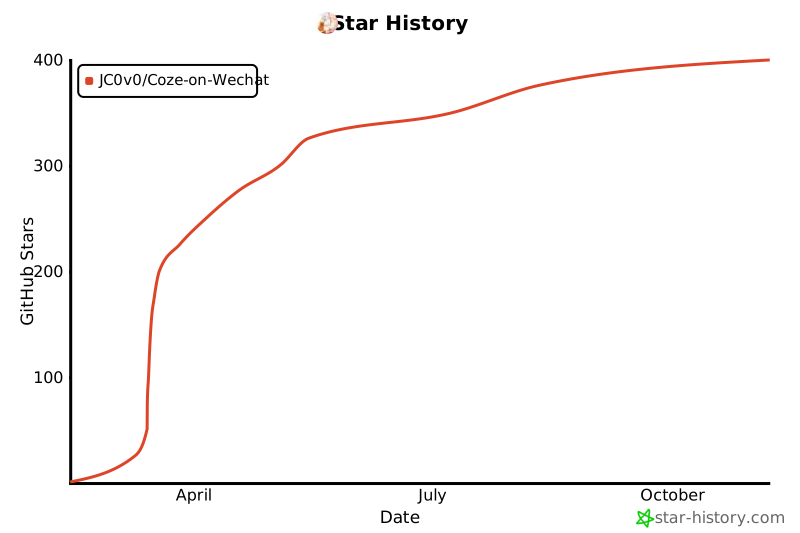
## 📊 项目统计
[](https://star-history.com/#JC0v0/Coze-on-Wechat&Date)