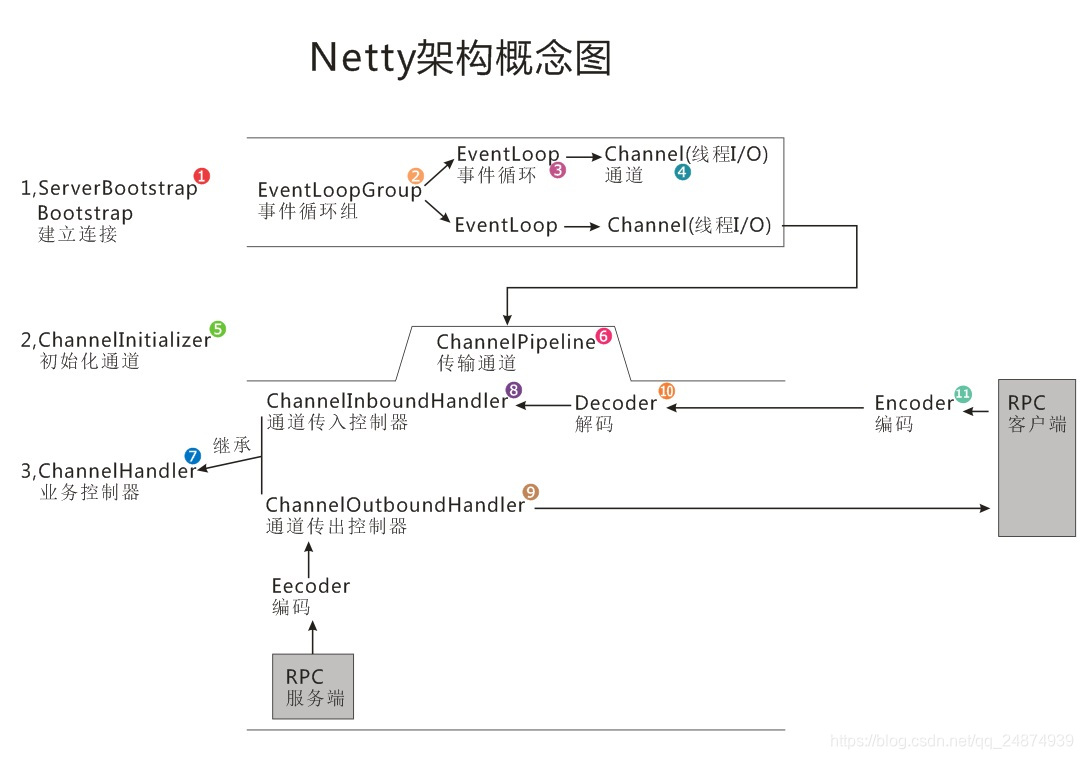
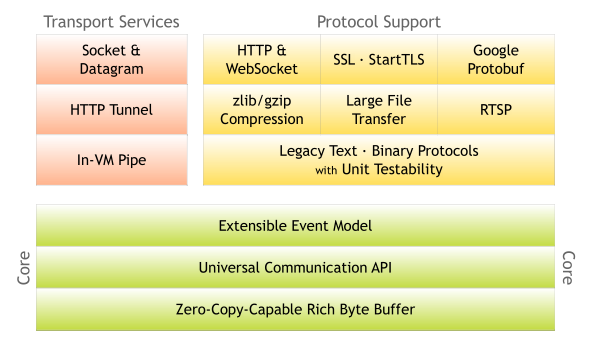
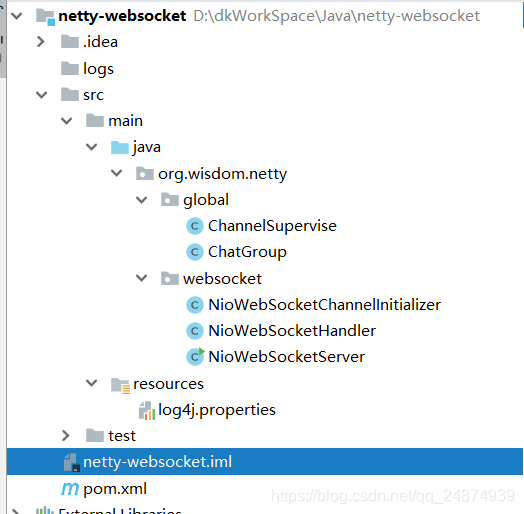
# netty消息服务websocket接受消息,post推送消息 **Repository Path**: freestylewill/netty-ws ## Basic Information - **Project Name**: netty消息服务websocket接受消息,post推送消息 - **Description**: netty-websocket+http - **Primary Language**: Java - **License**: Apache-2.0 - **Default Branch**: master - **Homepage**: None - **GVP Project**: No ## Statistics - **Stars**: 0 - **Forks**: 6 - **Created**: 2022-01-13 - **Last Updated**: 2022-01-13 ## Categories & Tags **Categories**: Uncategorized **Tags**: None ## README # websocketWithNetty 基于netty搭建websocket服务器 > netty是由jboss提供的一款开源框架,常用于搭建RPC中的TCP服务器、websocket服务器,甚至是类似tomcat的web服务器,反正就是各种网络服务器,在处理高并发的项目中,有奇用!功能丰富且性能良好,基于java中NIO的二次封装,具有比原生NIO更好更稳健的体验。 ## netty的核心架构 ![在这里插入图片描述](https://img-blog.csdnimg.cn/20190222155103782.jpg?x-oss-process=image/watermark,type_ZmFuZ3poZW5naGVpdGk,shadow_10,text_aHR0cHM6Ly9ibG9nLmNzZG4ubmV0L3FxXzI0ODc0OTM5,size_16,color_FFFFFF,t_70) 官网给出的底层示意图: ![](https://netty.io/images/components.png) ## 1.项目结构 ![在这里插入图片描述](https://img-blog.csdnimg.cn/20190222155242720.png?x-oss-process=image/watermark,type_ZmFuZ3poZW5naGVpdGk,shadow_10,text_aHR0cHM6Ly9ibG9nLmNzZG4ubmV0L3FxXzI0ODc0OTM5,size_16,color_FFFFFF,t_70) 一个普通的maven项目即可 - 核心依赖: ```xml io.netty netty-all 4.1.6.Final com.fasterxml.jackson.core jackson-databind 2.9.7 log4j log4j 1.2.17 ``` ## 代码 1.启动类 ```java public class NioWebSocketServer { private final Logger logger=Logger.getLogger(this.getClass()); private void init(){ logger.info("正在启动websocket服务器"); NioEventLoopGroup boss=new NioEventLoopGroup(); NioEventLoopGroup work=new NioEventLoopGroup(); try { ServerBootstrap bootstrap=new ServerBootstrap(); bootstrap.group(boss,work); bootstrap.channel(NioServerSocketChannel.class); bootstrap.childHandler(new NioWebSocketChannelInitializer()); Channel channel = bootstrap.bind(8081).sync().channel(); logger.info("webSocket服务器启动成功:"+channel); channel.closeFuture().sync(); } catch (InterruptedException e) { e.printStackTrace(); logger.info("运行出错:"+e); }finally { boss.shutdownGracefully(); work.shutdownGracefully(); logger.info("websocket服务器已关闭"); } } public static void main(String[] args) { new NioWebSocketServer().init(); } } ``` netty搭建的服务器基本上都是差不多的写法: - 绑定主线程组和工作线程组,这部分对应架构图中的事件循环组 - 只有服务器才需要绑定端口,客户端是绑定一个地址 - 配置channel(数据通道)参数,重点就是`ChannelInitializer`的配置 - 以异步的方式启动,最后是结束关闭两个线程组 2.ChannelInitializer写法 ```java public class NioWebSocketChannelInitializer extends ChannelInitializer { @Override protected void initChannel(SocketChannel ch) { ch.pipeline().addLast("logging",new LoggingHandler("DEBUG"));//设置log监听器,并且日志级别为debug,方便观察运行流程 ch.pipeline().addLast("http-codec",new HttpServerCodec());//设置解码器 ch.pipeline().addLast("aggregator",new HttpObjectAggregator(65536));//聚合器,使用websocket会用到 ch.pipeline().addLast("http-chunked",new ChunkedWriteHandler());//用于大数据的分区传输 ch.pipeline().addLast("handler",new NioWebSocketHandler());//自定义的业务handler } } ``` 3.自定义的处理器**NioWebSocketHandler** ```java public class NioWebSocketHandler extends SimpleChannelInboundHandler { private final Logger logger=Logger.getLogger(this.getClass()); private WebSocketServerHandshaker handshaker; @Override protected void channelRead0(ChannelHandlerContext ctx, Object msg) throws Exception { logger.debug("收到消息:"+msg); if (msg instanceof FullHttpRequest){ //以http请求形式接入,但是走的是websocket handleHttpRequest(ctx, (FullHttpRequest) msg); }else if (msg instanceof WebSocketFrame){ //处理websocket客户端的消息 handlerWebSocketFrame(ctx, (WebSocketFrame) msg); } } @Override public void channelActive(ChannelHandlerContext ctx) throws Exception { //添加连接 logger.debug("客户端加入连接:"+ctx.channel()); ChannelSupervise.addChannel(ctx.channel()); } @Override public void channelInactive(ChannelHandlerContext ctx) throws Exception { //断开连接 logger.debug("客户端断开连接:"+ctx.channel()); ChannelSupervise.removeChannel(ctx.channel()); } @Override public void channelReadComplete(ChannelHandlerContext ctx) throws Exception { ctx.flush(); } private void handlerWebSocketFrame(ChannelHandlerContext ctx, WebSocketFrame frame){ // 判断是否关闭链路的指令 if (frame instanceof CloseWebSocketFrame) { handshaker.close(ctx.channel(), (CloseWebSocketFrame) frame.retain()); return; } // 判断是否ping消息 if (frame instanceof PingWebSocketFrame) { ctx.channel().write( new PongWebSocketFrame(frame.content().retain())); return; } // 本例程仅支持文本消息,不支持二进制消息 if (!(frame instanceof TextWebSocketFrame)) { logger.debug("本例程仅支持文本消息,不支持二进制消息"); throw new UnsupportedOperationException(String.format( "%s frame types not supported", frame.getClass().getName())); } // 返回应答消息 String request = ((TextWebSocketFrame) frame).text(); logger.debug("服务端收到:" + request); TextWebSocketFrame tws = new TextWebSocketFrame(new Date().toString() + ctx.channel().id() + ":" + request); // 群发 ChannelSupervise.send2All(tws); // 返回【谁发的发给谁】 // ctx.channel().writeAndFlush(tws); } /** * 唯一的一次http请求,用于创建websocket * */ private void handleHttpRequest(ChannelHandlerContext ctx, FullHttpRequest req) { //要求Upgrade为websocket,过滤掉get/Post if (!req.decoderResult().isSuccess() || (!"websocket".equals(req.headers().get("Upgrade")))) { //若不是websocket方式,则创建BAD_REQUEST的req,返回给客户端 sendHttpResponse(ctx, req, new DefaultFullHttpResponse( HttpVersion.HTTP_1_1, HttpResponseStatus.BAD_REQUEST)); return; } WebSocketServerHandshakerFactory wsFactory = new WebSocketServerHandshakerFactory( "ws://localhost:8081/websocket", null, false); handshaker = wsFactory.newHandshaker(req); if (handshaker == null) { WebSocketServerHandshakerFactory .sendUnsupportedVersionResponse(ctx.channel()); } else { handshaker.handshake(ctx.channel(), req); } } /** * 拒绝不合法的请求,并返回错误信息 * */ private static void sendHttpResponse(ChannelHandlerContext ctx, FullHttpRequest req, DefaultFullHttpResponse res) { // 返回应答给客户端 if (res.status().code() != 200) { ByteBuf buf = Unpooled.copiedBuffer(res.status().toString(), CharsetUtil.UTF_8); res.content().writeBytes(buf); buf.release(); } ChannelFuture f = ctx.channel().writeAndFlush(res); // 如果是非Keep-Alive,关闭连接 if (!isKeepAlive(req) || res.status().code() != 200) { f.addListener(ChannelFutureListener.CLOSE); } } } ``` 执行流程是: - web发起一次类似是http的请求,并在`channelRead0`方法中进行处理,并通过instanceof去判断帧对象是`FullHttpRequest`还是`WebSocketFrame`,建立连接是时候会是`FullHttpRequest` - 在`handleHttpRequest`方法中去创建websocket,首先是判断`Upgrade`是不是websocket协议,若不是则通过`sendHttpResponse`将错误信息返回给客户端,紧接着通过`WebSocketServerHandshakerFactory`创建socket对象并通过handshaker握手创建连接 - 在连接创建好后的所以消息流动都是以`WebSocketFrame`来体现 - 在`handlerWebSocketFrame`去处理消息,也可能是客户端发起的关闭指令,ping指令等等 4.保存客户端的信息 当有客户端连接时候会被`channelActive`监听到,当断开时会被`channelInactive`监听到,一般在这两个方法中去保存/移除客户端的通道信息,而通道信息保存在`ChannelSupervise`中: ```java public class ChannelSupervise { private static ChannelGroup GlobalGroup=new DefaultChannelGroup(GlobalEventExecutor.INSTANCE); private static ConcurrentMap ChannelMap=new ConcurrentHashMap(); public static void addChannel(Channel channel){ GlobalGroup.add(channel); ChannelMap.put(channel.id().asShortText(),channel.id()); } public static void removeChannel(Channel channel){ GlobalGroup.remove(channel); ChannelMap.remove(channel.id().asShortText()); } public static Channel findChannel(String id){ return GlobalGroup.find(ChannelMap.get(id)); } public static void send2All(TextWebSocketFrame tws){ GlobalGroup.writeAndFlush(tws); } } ``` ChannelGroup是netty提供用于管理web于服务器建立的通道channel的,其本质是一个高度封装的set集合,在服务器广播消息时,可以直接通过它的writeAndFlush将消息发送给集合中的所有通道中去。但在查找某一个客户端的通道时候比较坑爹,必须通过channelId对象去查找,而channelId不能人为创建,所有必须通过map将channelId的字符串和channel保存起来。 为什么不能人为创建channelId: 1.channelId是实现类`DefaultChannelId`这一点可以通过debug它的find发现: ![在这里插入图片描述](https://img-blog.csdnimg.cn/2019022216352537.png?x-oss-process=image/watermark,type_ZmFuZ3poZW5naGVpdGk,shadow_10,text_aHR0cHM6Ly9ibG9nLmNzZG4ubmV0L3FxXzI0ODc0OTM5,size_16,color_FFFFFF,t_70) 而DefaultChannelId中不提供任何修改channelId的操作,并且由final修飾不能被继承: ![在这里插入图片描述](https://img-blog.csdnimg.cn/20190222163727798.png?x-oss-process=image/watermark,type_ZmFuZ3poZW5naGVpdGk,shadow_10,text_aHR0cHM6Ly9ibG9nLmNzZG4ubmV0L3FxXzI0ODc0OTM5,size_16,color_FFFFFF,t_70) 而我们获取的字符串形式的channelId实际上是它创建时候通过一定的算法生成的。 > 想要获取channel信息还是老老实实的封装一个map去维护字符串形式的id于channel的对应关系吧。 ## 测试运行 客户端代码,只需要javascript的内置对象websocket即可: ```javascript var socket; if(!window.WebSocket){ window.WebSocket = window.MozWebSocket; } if(window.WebSocket){ socket = new WebSocket("ws://localhost:8081/websocket"); socket.onmessage = function(event){ var ta = document.getElementById('responseText'); ta.value += event.data+"\r\n"; }; socket.onopen = function(event){ var ta = document.getElementById('responseText'); ta.value = "打开WebSoket 服务正常,浏览器支持WebSoket!"+"\r\n"; }; socket.onclose = function(event){ var ta = document.getElementById('responseText'); ta.value = ""; ta.value = "WebSocket 关闭"+"\r\n"; }; }else{ alert("您的浏览器不支持WebSocket协议!"); } function send(message){ if(!window.WebSocket){return;} if(socket.readyState == WebSocket.OPEN){ socket.send(message); }else{ alert("WebSocket 连接没有建立成功!"); } } ``` > 给出一个websocket的参考API地址:https://developer.mozilla.org/zh-CN/docs/Web/API/WebSocket/WebSocket 当web通过websocket对象连接 ``` ws://192.168.3.180:8081/websocket?token=token ``` 主要是`Upgrade: websocket`。如果直接在浏览器输入http://localhost:8081/websocket #后端推送接口 >cid=用户链接的id字符串 channel.id().asShortText() > token=用户令牌 > msg=消息体 > type=消息类型|all=全站|one=单发 >消息体需要用js加密,服务端会解密 ``` msg=encodeURIComponent(msg) ``` ###1全站推消息 ``` http://192.168.3.180:8081/websocket?token=token&type=all&msg=%7B%22%22%7D ``` ###单发消息 ``` http://192.168.3.180:8081/websocket?token=token&type=one&msg=%7B%22%22%7D&cid=e22fc1be ```