# Spark
**Repository Path**: itcloudy/Spark
## Basic Information
- **Project Name**: Spark
- **Description**: No description available
- **Primary Language**: Unknown
- **License**: BSD-2-Clause
- **Default Branch**: master
- **Homepage**: None
- **GVP Project**: No
## Statistics
- **Stars**: 0
- **Forks**: 0
- **Created**: 2024-01-30
- **Last Updated**: 2024-01-30
## Categories & Tags
**Categories**: Uncategorized
**Tags**: None
## README
#### [[English]](./README.md) [中文] [[API Document]](./API.md) [[API文档]](./API.ZH.md)
---
Spark
**Spark** 是一个免费、安全、开源、基于网页、跨平台且功能丰富的远程管理工具,可以让你通过浏览器,随时随地管理设备。
本项目**不**收集你的任何信息,无论是服务端或是客户端。因此,服务端永远不会自动更新,客户端永远只会与服务端通信。
---
||||
|-|-|-|
|[](https://github.com/XZB-1248/Spark/releases)|[](https://github.com/XZB-1248/Spark/releases/latest)|
|-|-|
---
## 说明
由于本人忙于其他事务,且本项目被滥用于网络攻击,项目将停止维护并转为归档状态。
我将不会再为本项目提供任何支持,项目宣告烂尾。
---
## 免责声明
**本项目及其源代码和发行版,旨在用于学习和交流。**
**禁止用于任何非法用途!**
**使用本项目所带来的风险由使用者本人承担。**
**作者和开发者不会对你错误使用而造成的损害承担任何责任。**
**数据无价,在点击任何按钮、输入任何命令之前,请三思。**
如果你发现了任何安全问题,请**不要**发布issue,并立即[**联系我**](mailto:i@1248.ink)。
---
## 快速开始
### 本地安装
* [下载服务端](https://github.com/XZB-1248/Spark/releases),按照[配置文件说明](#配置文件),设置好配置文件。
* 运行服务端,访问`IP:端口`,例如 `http://localhost:8000/` 。
* 在管理页面中生成客户端,并部署到设备上。
* 现在就可以控制这个设备了。
---
## 配置文件
在服务端的根目录下,创建`config.json`文件,按照以下格式填写:
```json
{
"listen": ":8000",
"salt": "123456abcdef",
"auth": {
"username": "password"
},
"log": {
"level": "info",
"path": "./logs",
"days": 7
}
}
```
* `listen` `必填`,格式为 `IP:端口`
* `salt` `必填`,修改后需要重新部署客户端,长度不大于24
* `auth` `选填`,格式为 `用户名:密码`
* 密码强烈建议使用hash加密
* 格式为`$算法$密文`,例如`$sha256$11223344556677AABBCCDDEEFF`
* 支持的算法有:`sha256`,`sha512`和`bcrypt`
* 如果不按照格式填写,将会被视为明文密码
* `log` `选填`,日志配置
* `level` `选填`,可选值:`disable`, `fatal`, `error`, `warn`, `info`, `debug`
* `path` `选填`,默认为`./logs`
* `days` `选填`,默认为`7`
---
## 特性
| 特性/OS | Windows | Linux | MacOS |
|-------|---------|-------|-------|
| 进程管理 | ✔ | ✔ | ✔ |
| 结束进程 | ✔ | ✔ | ✔ |
| 网络状态 | ✔ | ✔ | ✔ |
| 文件浏览 | ✔ | ✔ | ✔ |
| 文件传输 | ✔ | ✔ | ✔ |
| 文件编辑 | ✔ | ✔ | ✔ |
| 删除文件 | ✔ | ✔ | ✔ |
| 代码高亮 | ✔ | ✔ | ✔ |
| 屏幕监控 | ✔ | ✔ | ✔ |
| 屏幕快照 | ✔ | ✔ | ✔ |
| 系统信息 | ✔ | ✔ | ✔ |
| 远程终端 | ✔ | ✔ | ✔ |
| * 关机 | ✔ | ✔ | ✔ |
| * 重启 | ✔ | ✔ | ✔ |
| * 注销 | ✔ | ❌ | ✔ |
| * 睡眠 | ✔ | ❌ | ✔ |
| * 休眠 | ✔ | ❌ | ❌ |
| * 锁屏 | ✔ | ❌ | ❌ |
* 空单元格代表目前暂未测试。
* 星号代表该功能可能需要管理员或root权限才能使用。
---
## 截图


---
## 开发
### 注意
本项目由三个部分组成,你必须把它们都编译一下。
如果你不想陷入无止尽的安装、配置的过程,建议去 [快速开始](#快速开始) 。
* 客户端
* 服务端
* 前端页面
如果要让客户端支持除了Linux和Windows之外的系统,你必须要安装对应的C交叉编译工具链。
例如,如果要给Android系统编译客户端,那就必须安装 [Android NDK](https://developer.android.com/ndk/downloads) 。
### 指南
```bash
# Clone该项目。
$ git clone https://github.com/XZB-1248/Spark
$ cd ./Spark
# 开始编译前端页面。
$ cd ./web
# 安装所有的依赖,然后编译。
$ npm install
$ npm run build-prod
# 通过statik,将前端文件嵌入到服务端里。
$ cd ..
$ go install github.com/rakyll/statik
$ statik -m -src="./web/dist" -f -dest="./server/embed" -p web -ns web
# 开始编译客户端。
# 在使用类Unix系统时,运行以下命令。
$ mkdir ./built
$ go mod tidy
$ go mod download
$ ./scripts/build.client.sh
# 最终开始编译服务端。
$ mkdir ./releases
$ ./scripts/build.server.sh
```
另外新建一个目录,将`releases`目录中对应的服务端版本复制进去。
回到项目目录,把整个`built`目录复制到新建的目录中。
最后,把开头提到的配置文件也复制进去,即可运行服务端。
---
## 项目依赖
Spark使用了许多第三方的开源项目。
依赖列表可以在 `go.mod` 和 `package.json` 里面找到。
一些主要的依赖项如下列所示。
### 后端
* [Go](https://github.com/golang/go) ([License](https://github.com/golang/go/blob/master/LICENSE))
* [gin-gonic/gin](https://github.com/gin-gonic/gin) (MIT License)
* [imroc/req](https://github.com/imroc/req) (MIT License)
* [kbinani/screenshot](https://github.com/kbinani/screenshot) (MIT License)
* [shirou/gopsutil](https://github.com/shirou/gopsutil) ([License](https://github.com/shirou/gopsutil/blob/master/LICENSE))
* [gorilla/websocket](https://github.com/gorilla/websocket) (BSD-2-Clause License)
* [olahol/melody](https://github.com/olahol/melody) (BSD-2-Clause License)
* [orcaman/concurrent-map](https://github.com/orcaman/concurrent-map) (MIT License)
### 前端
* [React](https://github.com/facebook/react) (MIT License)
* [Ant-Design](https://github.com/ant-design/ant-design) (MIT License)
* [axios](https://github.com/axios/axios) (MIT License)
* [xterm.js](https://github.com/xtermjs/xterm.js) (MIT License)
* [crypto-js](https://github.com/brix/crypto-js) (MIT License)
### 感谢
* [natpass](https://github.com/lwch/natpass) (MIT License)
* 图像差异算法部分参考了natpass项目的有关逻辑。
---
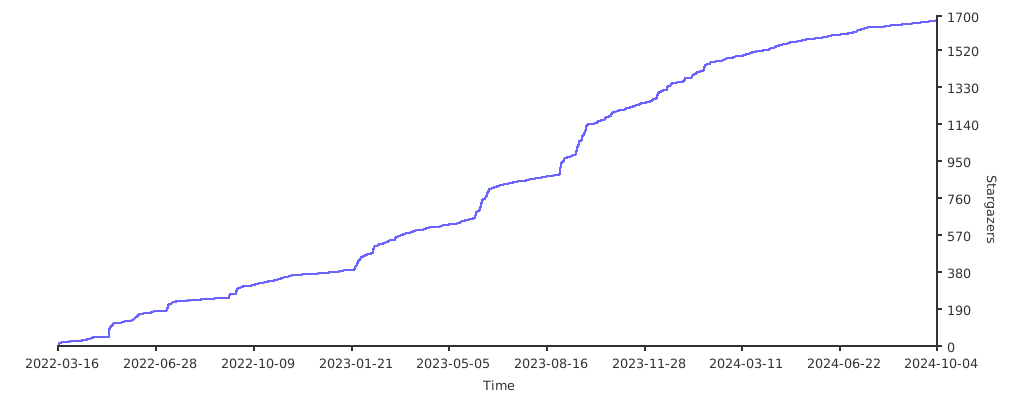
### Star趋势
[](https://starchart.cc/XZB-1248/Spark)
---
## 开源协议
本项目基于 [BSD-2 协议](./LICENSE) 。