# Cherry Markdown Writer
[](https://cnb.cool/tencent/cherry-markdown/cherry-markdown) [](https://cloudstudio.net#https://github.com/Tencent/cherry-markdown)
English | [简体中文](./README.CN.md)
## Introduction
Cherry Markdown Writer is a Javascript Markdown editor. It has the advantages such as out-of-the-box, lightweight and easy to extend. It can run in browser or server(with NodeJs).
### Document
- [Getting Started with Cherry Markdown Editor](https://github.com/Tencent/cherry-markdown/wiki/%E5%88%9D%E8%AF%86cherry-markdown-%E7%BC%96%E8%BE%91%E5%99%A8)
- [hello world](https://github.com/Tencent/cherry-markdown/wiki/hello-world)
- [Configuring Image & File Upload Interfaces](https://github.com/Tencent/cherry-markdown/wiki/%E9%85%8D%E7%BD%AE%E5%9B%BE%E7%89%87&%E6%96%87%E4%BB%B6%E4%B8%8A%E4%BC%A0%E6%8E%A5%E5%8F%A3)
- [Adjusting the Toolbar](https://github.com/Tencent/cherry-markdown/wiki/%E8%B0%83%E6%95%B4%E5%B7%A5%E5%85%B7%E6%A0%8F)
- [Comprehensive Configuration Options](https://github.com/Tencent/cherry-markdown/wiki/%E9%85%8D%E7%BD%AE%E9%A1%B9%E5%85%A8%E8%A7%A3)
- [Custom Syntax](https://github.com/Tencent/cherry-markdown/wiki/%E8%87%AA%E5%AE%9A%E4%B9%89%E8%AF%AD%E6%B3%95)
- [Configuring Themes](https://github.com/Tencent/cherry-markdown/wiki/%E9%85%8D%E7%BD%AE%E4%B8%BB%E9%A2%98)
- [Extending Code Block Syntax](https://github.com/Tencent/cherry-markdown/wiki/%E6%89%A9%E5%B1%95%E4%BB%A3%E7%A0%81%E5%9D%97%E8%AF%AD%E6%B3%95)
- [Events & Callbacks](https://github.com/Tencent/cherry-markdown/wiki/%E4%BA%8B%E4%BB%B6&%E5%9B%9E%E8%B0%83)
- [API](https://tencent.github.io/cherry-markdown/examples/api.html)
### Demos
- [Full Model](https://tencent.github.io/cherry-markdown/examples/index.html)
- [Basic](https://tencent.github.io/cherry-markdown/examples/basic.html)
- [Mobile](https://tencent.github.io/cherry-markdown/examples/h5.html)
- [Multiple Instances](https://tencent.github.io/cherry-markdown/examples/multiple.html)
- [Editor Without Toolbar](https://tencent.github.io/cherry-markdown/examples/notoolbar.html)
- [Pure Preview](https://tencent.github.io/cherry-markdown/examples/preview_only.html)
- [XSS](https://tencent.github.io/cherry-markdown/examples/xss.html) (Disabled by default; requires configuration to enable XSS)
- [IMG WYSIWYG](https://tencent.github.io/cherry-markdown/examples/img.html)
- [Table WYSIWYG](https://tencent.github.io/cherry-markdown/examples/table.html)
- [Headers with Auto Num](https://tencent.github.io/cherry-markdown/examples/head_num.html)
- [Streaming rendering Mode (AI chat scenario)](https://tencent.github.io/cherry-markdown/examples/ai_chat.html)
- [VIM Editing Mode](https://tencent.github.io/cherry-markdown/examples/vim.html)
- [Utilize Your Own Mermaid.js](https://tencent.github.io/cherry-markdown/examples/mermaid.html)
- [Custom Code Block Wrapper](https://tencent.github.io/cherry-markdown/examples/custom_codeblock_wrapper.html)
-----
### **Out-of-the-box**
Developer can call and instantiate Cherry Markdown Editor in a very simple way. The instantiated Cherry Markdown Editor supports most commonly used markdown syntax (such as title, TOC, flowchart, formula, etc.) by default.
### **Easy to extend**
When the syntax that Cherry Markdown writer support can not meet your needs, secondary development or function extension can be carried out quickly. At the same time, Cherry Markdown writer should be implemented by pure JavaScript, and should not rely on framework technology such as angular, vue and react. Framework only provide a container environment.
### Incremental / Progressive / Streaming rendering
After enabling streaming rendering, Cherry will automatically complete the following syntax elements to avoid exposing Markdown source code, ensuring stable output during the streaming process([demo](https://tencent.github.io/cherry-markdown/examples/ai_chat.html)):
- Headings
- Bold and italic text
- Hyperlinks
- Images and audio/video
- Inline code blocks
- Block code blocks
- Inline formulas
- Block formulas
- Unordered lists
- Tables
- Mermaid diagrams
- Footnotes
## Feature
### Syntax Feature
1. Image zoom, alignment and reference
2. Generate a chart based on table content
3. Adjust font color and size
4. Font background color, superscript and subscript
5. Insert checklist
6. Insert audio and video
7. Mermaid diagrams and math formulas
8. Info panels
### Functional Feature
1. Paste from rich text as markdown
2. Classic & regular line break modes
3. Multi-cursor editing
4. Image size editing
5. Table editing
6. Table -> Chart (generate chart from table content)
7. Export as image or PDF
8. Floating toolbar: appears at the beginning of a new line
9. Bubble toolbar: appears when text is selected
10. Set shortcut keys
11. Floating table of contents
12. Theme switching
13. Input suggestion (autocomplete)
14. AI Chat scenario: stream-mode output supported
### Performance Feature
1. partial rendering
2. partial update
### Security
Cherry Markdown has a built-in security Hook, by filtering the whitelist and DomPurify to do scan filter.
### Style theme
Cherry Markdown has a variety of style themes to choose from.
### Features Showcase
Click to view the features demonstration [Features demo](https://github.com/Tencent/cherry-markdown/wiki/%E7%89%B9%E6%80%A7%E5%B1%95%E7%A4%BA-features)
## Install
Via yarn
```bash
yarn add cherry-markdown
```
Via npm
```bash
npm install cherry-markdown --save
```
If you need to enable the functions of `mermaid` drawing and table-to-chart, you need to add `mermaid` and `echarts` packages at the same time.
Cherry Markdown has built-in mermaid, if you want to use a specified version of mermaid, you can refer to [wiki](https://github.com/Tencent/cherry-markdown/wiki/%E6%9E%84%E5%BB%BA%E4%BA%A7%E7%89%A9%E4%BB%8B%E7%BB%8D)
## Quick start
### Browser
#### UMD
```html
```
#### ESM
```javascript
import 'cherry-markdown/dist/cherry-markdown.css';
import Cherry from 'cherry-markdown';
const cherryInstance = new Cherry({
id: 'markdown-container',
value: '# welcome to cherry editor!',
});
```
### Node
```javascript
const { default: CherryEngine } = require('cherry-markdown/dist/cherry-markdown.engine.core.common');
const cherryEngineInstance = new CherryEngine();
const htmlContent = cherryEngineInstance.makeHtml('# welcome to cherry editor!');
```
## Lite Version
Because the size of the mermaid library is very large, the cherry build product contains a core build package without built-in Mermaid. The core build can be imported in the following ways.
### Full mode (With UI Interface)
```javascript
import 'cherry-markdown/dist/cherry-markdown.css';
import Cherry from 'cherry-markdown/dist/cherry-markdown.core';
const cherryInstance = new Cherry({
id: 'markdown-container',
value: '# welcome to cherry editor!',
});
```
### Engine Mode (Just Syntax Compile)
```javascript
// Import Cherry engine core construction
// Engine configuration items are the same as Cherry configuration items, the following document content only introduces the Cherry core package
import CherryEngine from 'cherry-markdown/dist/cherry-markdown.engine.core';
const cherryEngineInstance = new CherryEngine();
const htmlContent = cherryEngineInstance.makeHtml('# welcome to cherry editor!');
// -->
welcome to cherry editor!
```
### ⚠️ About mermaid
The core build package does not contain mermaid dependency, should import related plug-ins manually.
```javascript
import 'cherry-markdown/dist/cherry-markdown.css';
import Cherry from 'cherry-markdown/dist/cherry-markdown.core';
import CherryMermaidPlugin from 'cherry-markdown/dist/addons/cherry-code-block-mermaid-plugin';
import mermaid from 'mermaid';
// Plug-in registration must be done before Cherry is instantiated
Cherry.usePlugin(CherryMermaidPlugin, {
mermaid, // pass in mermaid object
// mermaidAPI: mermaid.mermaidAPI, // Can also be passed in mermaid API
// At the same time, you can configure mermaid's behavior here, please refer to the official mermaid document
// theme: 'neutral',
// sequence: { useMaxWidth: false, showSequenceNumbers: true }
});
const cherryInstance = new Cherry({
id: 'markdown-container',
value: '# welcome to cherry editor!',
});
```
From mermaid v10.0.0, the rendering logic changed from synchronous to asynchronous. After `afterChange` or `afterInit` events, mermaid code blocks are rendered as placeholders first, then rendered asynchronously and replaced.
If you need to get the content after asynchronous rendering is finished, you can use the following example:
````js
const cherryInstance = new Cherry({
id: 'markdown-container',
// Use a template string to include the mermaid code block directly
value: `
```mermaid
graph LR
A[Company] -->| Off work | B(Market)
B --> C{See melon seller}
C -->|Yes| D[Buy a bun]
C -->|No| E[Buy one pound of buns]
```
`,
callback: {
afterAsyncRender: (md, html) => {
// md is the markdown source, html is the rendered result
}
}
});
````
### Dynamic import
**recommend** Using Dynamic import, the following is an example of webpack Dynamic import.
```javascript
import 'cherry-markdown/dist/cherry-markdown.css';
import Cherry from 'cherry-markdown/dist/cherry-markdown.core';
const registerPlugin = async () => {
const [{ default: CherryMermaidPlugin }, mermaid] = await Promise.all([
import('cherry-markdown/src/addons/cherry-code-block-mermaid-plugin'),
import('mermaid'),
]);
Cherry.usePlugin(CherryMermaidPlugin, {
mermaid, // pass in mermaid object
});
};
registerPlugin().then(() => {
// Plug-in registration must be done before Cherry is instantiated
const cherryInstance = new Cherry({
id: 'markdown-container',
value: '# welcome to cherry editor!',
});
});
```
## Configuration
see `/src/Cherry.config.js` or click [here](https://github.com/Tencent/cherry-markdown/wiki/%E9%85%8D%E7%BD%AE%E9%A1%B9%E5%85%A8%E8%A7%A3)
## Example
Click [here](https://github.com/Tencent/cherry-markdown/wiki) for more examples.
### Client
Under development, please stay tuned or see `/packages/client/`
## Extension
### Customize Syntax
See the custom syntax documentation: [Custom syntax docs](https://github.com/Tencent/cherry-markdown/wiki/%E8%87%AA%E5%AE%9A%E4%B9%89%E8%AF%AD%E6%B3%95)
### Customize Toolbar
Cherry supports five toolbar positions, each position can be extended with custom toolbar buttons. See the toolbar configuration documentation for details: [Customize toolbar buttons](https://github.com/Tencent/cherry-markdown/wiki/%E8%B0%83%E6%95%B4%E5%B7%A5%E5%85%B7%E6%A0%8F#%E8%87%AA%E5%AE%9A%E4%B9%89%E5%B7%A5%E5%85%B7%E6%A0%8F%E6%8C%89%E9%92%AE).
## Unit Test
`Vitest` has been added as a basic configuration, but the related test cases have not been fully tested. Welcome to submit rich test cases.
## Contribution Guidelines
Welcome to join us in building a powerful Markdown editor. You can also submit feature requests as issues. Before writing new features, you can learn about the [Introduction to cherry-markdown editor](https://github.com/Tencent/cherry-markdown/wiki/%E5%88%9D%E8%AF%86-cherry-markdown-%E7%BC%96%E8%BE%91%E5%99%A8). Please read the [Contribution Guidelines](https://github.com/Tencent/cherry-markdown/wiki/%E8%B4%A1%E7%8C%AE%E6%8C%87%E5%8D%97%20Contribution%20Guidelines) before making contributions.
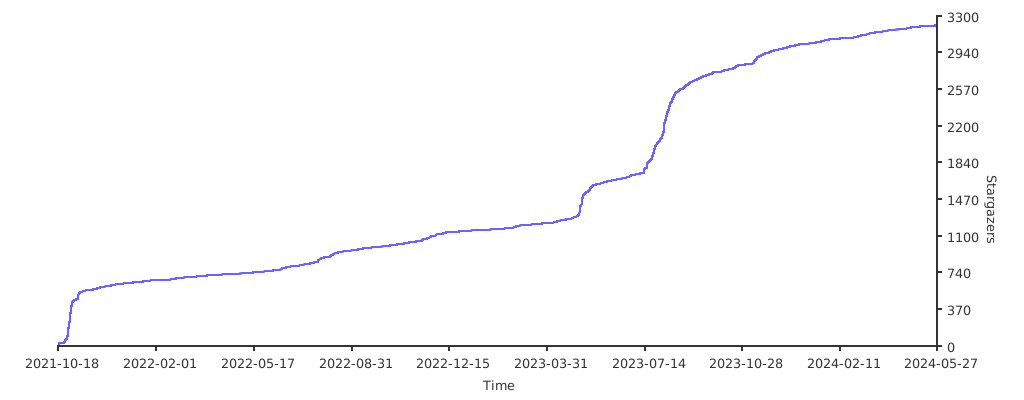
## Stargazers over time
[](https://starchart.cc/Tencent/cherry-markdown)
## License
[Apache-2.0](./LICENSE)
