# vue-img-cutter
**Repository Path**: vebin/vue-img-cutter
## Basic Information
- **Project Name**: vue-img-cutter
- **Description**: 简单易用的vue图片裁剪插件,支持移动图像,裁剪图片,放大缩小图片,上下左右移动,固定比例,固定尺寸,远程图片裁剪,只需要很少的代码就可以实现裁剪功能,也可以通过调整参数以适应你自己的业务需求。
- **Primary Language**: JavaScript
- **License**: Apache-2.0
- **Default Branch**: master
- **Homepage**: https://ihtmlcss.com/demo/dist/#/croptool
- **GVP Project**: No
## Statistics
- **Stars**: 0
- **Forks**: 121
- **Created**: 2023-12-23
- **Last Updated**: 2023-12-23
## Categories & Tags
**Categories**: Uncategorized
**Tags**: None
## README
# vue-img-cutter
#### [中文文档](README-zh-CN.md)
A image crop plug-in for Vue,you can use it to rotate、zoom images and cut any size
[](https://github.com/acccccccb/vue-img-cutter/stargazers)
[](https://github.com/acccccccb/vue-img-cutter/network)
[](https://www.npmjs.com/package/vue-img-cutter)
[](https://www.npmjs.com/package/vue-img-cutter)
### Features:
---
- For IE9+,MSEdge,Chrome,Firefox
- Your can config it in line or modal
- rotate、zoom
- Cut to scale
- Crop original image
- Crop remote pictures
### Screenshot:
---
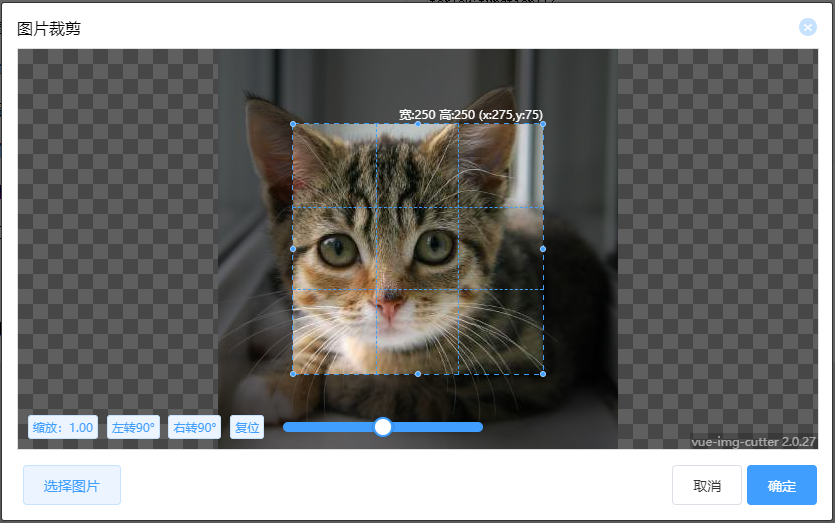
### Demo:
---
[https://www.ihtmlcss.com/demo/dist/#/croptool](https://www.ihtmlcss.com/demo/dist/#/croptool)
### Git:
---
Github:[https://github.com/acccccccb/vue-img-cutter](https://github.com/acccccccb/vue-img-cutter)
码云:[https://gitee.com/GLUESTICK/vue-img-cutter](https://gitee.com/GLUESTICK/vue-img-cutter)
**If this project is helpful to you, please give me a star :)**
### Usage method:
---
1. Install
```shell
npm install vue-img-cutter@2 --save-dev # for vue2
npm install vue-img-cutter@3 --save-dev # for vue3
```
2. Import ImgCutter.vue:
```javascript
import ImgCutter from 'vue-img-cutter'
export default {
components:{
ImgCutter
},
...
}
```
3. Write the code in template:
```html
```
4. Solt
```html
```
5. This method to be compatible with IE9,it can also be used to crop cross domain images
> - Create an object(name,src,~~width and height~~ are
> required).
> - this.\$refs.imgCutterModal.handleOpen(The Object).
```javascript
// The object like this.
let obj = {
name: '1.jpg', //Image name
src: 'http://url/1.jpg', // Image url
//width:200,//Image width remove in 2.1.9+
//height:200,//Image height remove in 2.1.9+
};
```
```javascript
ForIE9:function(){
// First you need create object have name,src.
// Then trigger handleOpen(obj) and deliver the obj.
this.$refs.imgCutterModal.handleOpen({
name:"image.jpg",
src:"http://imageServ.com/image.jpg",
});
}
```
### Parameter description:
---
| Attribute | Effect | Type | Require | Default |
|:------------------:|:---------------------------------------------------------------------------------:|:------------------:| :-----: | :---------------: |
| isModal | Is modal | Boolean | No | true |
| showChooseBtn | Show select btn | Boolean | No | true |
| lockScroll | Lock scroll when modal is show | Boolean | No | true |
| label | Button text | String | No | 选择图片 |
| boxWidth | Tool width | Number | No | 800 |
| boxHeight | Tool height | Number | No | 400 |
| cutWidth | Selection box width | Number | No | 200 |
| cutHeight | Selection box height | Number | No | 200 |
| tool | Show toolbar | Boolean | No | true |
| toolBgc | Toolbar background color | String(eg: "#fff") | No | #fff |
| sizeChange | Allow change size | Boolean | No | true |
| moveAble | Allow change position | Boolean | No | true |
| originalGraph | Crop original image | Boolean | No | false |
| crossOrigin | Is cross origin image | Boolean | No | false |
| crossOriginHeader | Set cross origin header | String | No | '' |
| rate | Aspect ratio | String(eg: "4:3") | No | - |
| WatermarkText | Watermark Text | String | No | '' |
| WatermarkTextFont | Watermark font size | String | No | '12px Sans-serif' |
| WatermarkTextColor | Watermark font color | String | No | '#fff' |
| WatermarkTextX | Watermark position x | Number | No | 0.95 |
| WatermarkTextY | Watermark position y | Number | No | 0.95 |
| smallToUpload | If choose image size less then defined Size,return file. sizeChange must be false | Boolean | No | false |
| saveCutPosition | Save last cut position and size | Boolean | No | false |
| scaleAble | Allow scale image | Boolean | No | true |
| imgMove | Allow move image | Boolean | No | true |
| toolBoxOverflow | Allow tool box out of picture range | Boolean | No | true |
| index | Return with result | Any | No | null |
| previewMode | Return results at any time,in case of performance problems, set this to false | Boolean | No | true |
| fileType | Return file type ( png / jpeg / webp) | String | No | png |
| quality | image quality | Number | No | 1 |
| accept | accept file type | String | No | 'image/gif, image/jpeg ,image/png' |
### Hook function:
| Attribute | Effect | Type | Require | Return |
| :---------: | :-------------------: | :------: | :-----: | :----------: |
| cutDown | Cut down image | Function | Yes | Object |
| error | Throw error | Function | No | Error object |
| onChooseImg | ChooseImg | Function | No | Object |
| onPrintImg | Print image to canvas | Function | No | Object |
| onClearAll | Clear all | Function | No | null |
### Slot(You can use slot="slot name" to custom button):
| Slot name | Effect |
| :------------: | :---------------------: |
| open | Choose btn |
| openImgCutter | Choose btn |
| choose | Choose btn(in tool) |
| cancel | Cancel btn |
| confirm | Confirm btn |
| ratio | Toolbar ratio |
| scaleReset | Toolbar reset scale |
| turnLeft | Toolbar turn left |
| turnRight | Toolbar turn right |
| reset | Toolbar reset |
| flipHorizontal | Toolbar flip horizontal |
| flipVertically | Toolbar flip vertically |
### Return @cutDown:
---
| Attribute | Description |
| :-------: | :--------------------------------------: |
| fileName | File name |
| file | File(Some versions of IE is not support) |
| blob | Blob(Some versions of IE is not support) |
| dataURL | dataURL |
### Development:
- Original picture
- Mirror
### Donation:


### Update log:
#### 3.0.4
- New prop(accept):accept file type[#可不可以在文件上传的accept 中加上webp #80](https://github.com/acccccccb/vue-img-cutter/issues/80)
#### 3.0.3
- bugfix:[#固定裁剪框位置时图片拖动优化建议 #74](https://github.com/acccccccb/vue-img-cutter/issues/74)
#### 3.0.2
- bugfix:[#note_11139264](https://gitee.com/GLUESTICK/vue-img-cutter#note_11139264)
- bugfix:[#64](https://github.com/acccccccb/vue-img-cutter/issues/64)
- New prop( quality ) : A Number between 0 and 1 indicating the image quality
#### 3.0.1
- bugfix:[#I4SDOE](https://gitee.com/GLUESTICK/vue-img-cutter/issues/I4SDOE)
- bugfix: dialog-footer default height 40px
- bugfix: width height x and y convert to int
#### 3.0.0
- chore:Build tool changed to vue3
---
#### 2.2.6
- New prop(accept):accept file type[#可不可以在文件上传的accept 中加上webp #80](https://github.com/acccccccb/vue-img-cutter/issues/80)
#### 2.2.5
- Bugfix:remove this in template
#### 2.2.4
- New prop( toolBoxOverflow ): Allow tool box out of picture range, default: true
#### 2.2.3
- Bug fix: When you set rate,the control-box didn't reach the expected position [#I3OXMW](https://gitee.com/GLUESTICK/vue-img-cutter/issues/I3OXMW)
#### 2.2.2
- New prop( imgMove ): Allow move img, default: true
#### 2.2.1
- New prop( fileType ):Return file type, default: png
#### 2.2.0
- New prop( index ):Return result with index.
- New prop( previewMode ):Return results at any time,in case of performance problems, set this to false.
- Fix Bug:Update style.
#### 2.1.10
- New features:
- 1.saveCutPosition:Save last cut position and size
- 2.scaleAble:Able/Disable scale image
#### 2.1.9
- Crop original image not need imageObj.width and imageObj.height
#### 2.1.8
- New features:smallToUpload, If choose image size less then defined Size,return file. sizeChange must be false. #20
#### 2.1.7
- Fix bug:#21 cropPicture() missed params
#### 2.1.6
- Add new hook function:onClearAll,onPrintImg,onChooseImg
#### 2.1.5
- Fix bug:Button add attrib type=button
#### 2.1.4
- Fix bug:Width display error
#### 2.1.3
- Fix bug:When no choose Image,you also can get an empty image,now you will get an error message in error callback
- Fix bug:When rate < 0 the result image size error;
#### 2.1.2
- New features:flip horizontal,flip vertically,Watermark
- Add slot:ratio,scaleReset,turnLeft,turnRight,reset,flipHorizontal,flipVertically
#### 2.1.1
- Add english documents
#### 2.1.0
- Add new attribute:originalGraph,originalGraph
- Fix bug: Inline mode can not scale image.
#### 2.0.30
- Fix bug: Constituency overflow.
#### 2.0.29
- UI optimization.
#### 2.0.28
- Show version
- New slot:choose/cancel/confirm
- New attribute:toolBgc
- Fix bug: Constituency overflow.
#### 2.0.27
- Fix bug:Remote image in the wrong place.
- Fix bug:An error occurred when click cancel btn in IE.
- Fix bug:Error loading remote picture will be correctly handle.
#### 2.0.26
- Fix bug:An error occurred when not choose any image.
#### 2.0.25
- Update readme.md
#### 2.0.24
- Update crop remote pictures method. eg:this.\$refs['yourComponent'].handleOpen(imgObj),imgObj must include(name,src,width,height)
- Fix bug: Inline mode can not scale image.
- New attribute: crossOrigin,crossOriginHeader
- New attribute: error,It can catch error.
#### 2.0.23
- New attribute:isModal/showChooseBtn/lockScroll
#### 2.0.22
- For IE9+,MSEdge,chrome,firefox
- UI optimization.
#### 2.0.21
- For IE8+,MSEdge,chrome,firefox
- New attribute:moveAble,sizeChange
- Fix bug:File is not return.
#### 2.0.20
- For IE11+,MSEdge,Chrome,Firefox
#### 2.0.19
- Result add file.
#### 2.0.18
- Fix bug:Reload pages when first click select image btn.
#### 2.0.17
- UI optimization.
#### 2.0.16
- UI optimization.
#### 2.0.15
- UI optimization.